Image Nano Banana 2
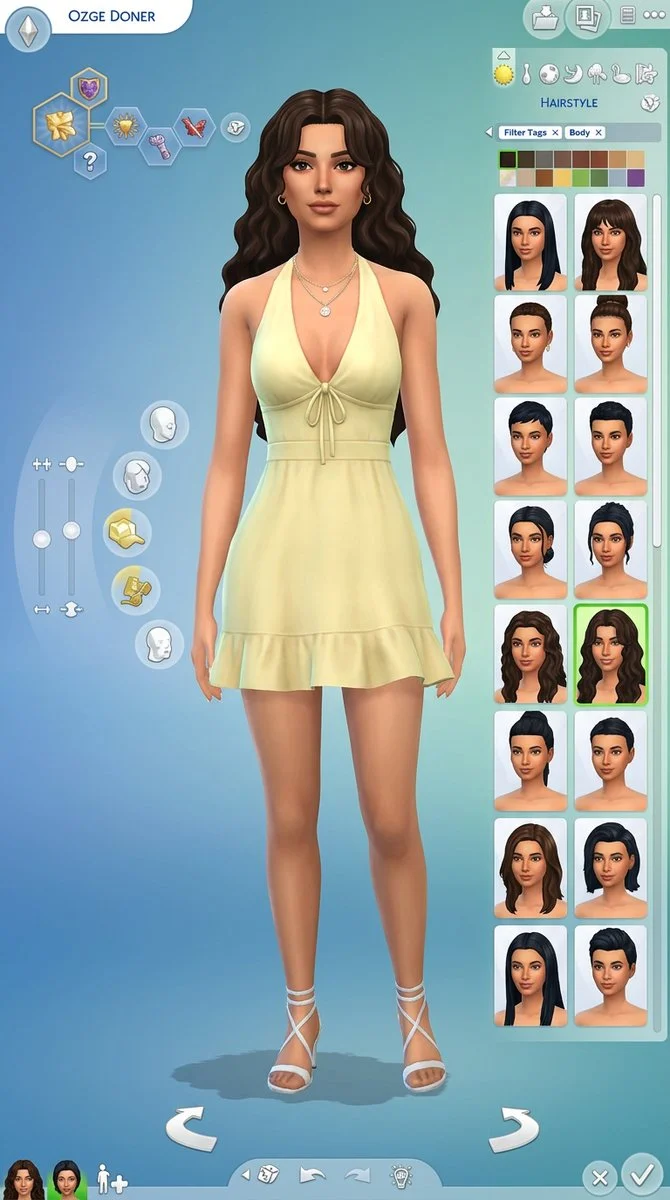
A Sims 4 Create-A-Sim screen shows Ozge in a yellow dress
A faithful recreation of The Sims 4 CAS interface featuring a stylized female character named Ozge Doner in a pale yellow halter dress with wavy dark hair, set against the classic blue-green gradient background with full UI panels.
Prompt
Create a high-resolution wide 16:9 screenshot of a Sims 4 Create-A-Sim character creation interface, extremely faithful to the real CAS layout and visual language.

The screen shows only the character creation interface, no house, no room, no gameplay collage. Use the classic Sims-style blue-to-green gradient background, soft rounded UI panels, circular category icons, clothing and body customization icons, hair color swatches, hairstyle thumbnails, filter tags, sliders, rotate arrows, checkmark and X buttons, and small character portrait thumbnails at the bottom left.

In the center stands a stylized Sims-like female character named “OZGE DONER” shown in the top left name bar. She should resemble the uploaded reference woman as a Sims character version: similar facial harmony, soft feminine features, warm skin tone, full lips, defined brows, almond eyes, elegant expression, and glamorous but game-stylized proportions. Do not make her look like a real photo; she should look like a polished Sims 4 custom content character.

She wears a pale yellow / buttery yellow halter-neck mini dress, tied at the chest with delicate strings, fitted waist, soft draped fabric, small ruffle hem, feminine summer style. Add white or nude strappy heels, subtle gold hoop earrings, delicate layered gold necklaces, and clean manicured nails.

Her hair is long voluminous dark brown wavy hair, center-parted or softly curtain-parted, glossy, romantic, slightly tousled, with face-framing waves. On the right-side UI panel, show the hairstyle category selected with several hairstyle thumbnails, hair color swatches, and the selected wavy hairstyle highlighted with a green outline.

The interface should feel very close to The Sims 4 CAS screen: left-side aspiration/trait hexagon icons, body sliders on the left, curved circular customization menu around the character, right-side hairstyle selection grid, top category icons, bottom rotate controls, and clean UI buttons. Keep all UI elements crisp, readable, and game-like.

Lighting should be soft and even, with the character clearly visible from head to mid-thigh or full body, centered and elegant. The whole image should look like an actual Sims character creation screenshot with high-quality custom content.

Important:
Only Create-A-Sim interface.
No house, no bedroom, no gameplay scene, no collage.
The character must have flawless stylized anatomy, natural arms and hands, correct fingers, realistic pose within Sims style, no distorted limbs.

Negative prompt:
house, bedroom, gameplay screen, collage, real photograph, hyperrealistic human, text errors, misspelled name, messy interface, ugly UI, distorted face, extra fingers, broken hands, deformed anatomy, warped body, low quality, blurry, duplicate characters, wrong outfit color, red dress, blue dress, short hair, straight flat hair
Published: May 28, 2026 by Özge Döner